

Learn how BSS order management moves telecom orders from catalog to billing, what Open APIs and cloud-native BSS changed, and how CSPs can reduce fallout.
A customer clicks “Buy” on a new fiber plan. Within seconds, that click must become a credit check, a router shipment, a network change, and a first bill. If any step breaks, the order stalls, and the customer calls. BSS order management is the system that keeps all those steps moving. This guide explains how it works in a modern telecom stack, what changed in 2025 and 2026, and what every CSP should check in its own setup.
What Is BSS Order Management?
BSS order management is the part of a business support system that captures, checks, and tracks customer orders from start to finish. A business support system (BSS) runs the customer side of a telecom, including products, pricing, orders, and billing. Its partner, the operations support system (OSS), runs the network side.
In short, order management sits between the two. It takes what the customer bought and turns it into tasks for the network, field teams, and billing. As a result, a telecom order management system touches more teams than almost any other tool. Many CSPs back it with a skilled order management team, since software alone cannot solve every order management challenge.
How an Order Moves Through a Modern BSS
Order management in telecom follows a clear path, from the product catalog to the first bill. The graphic below shows each step and where orders most often stall.
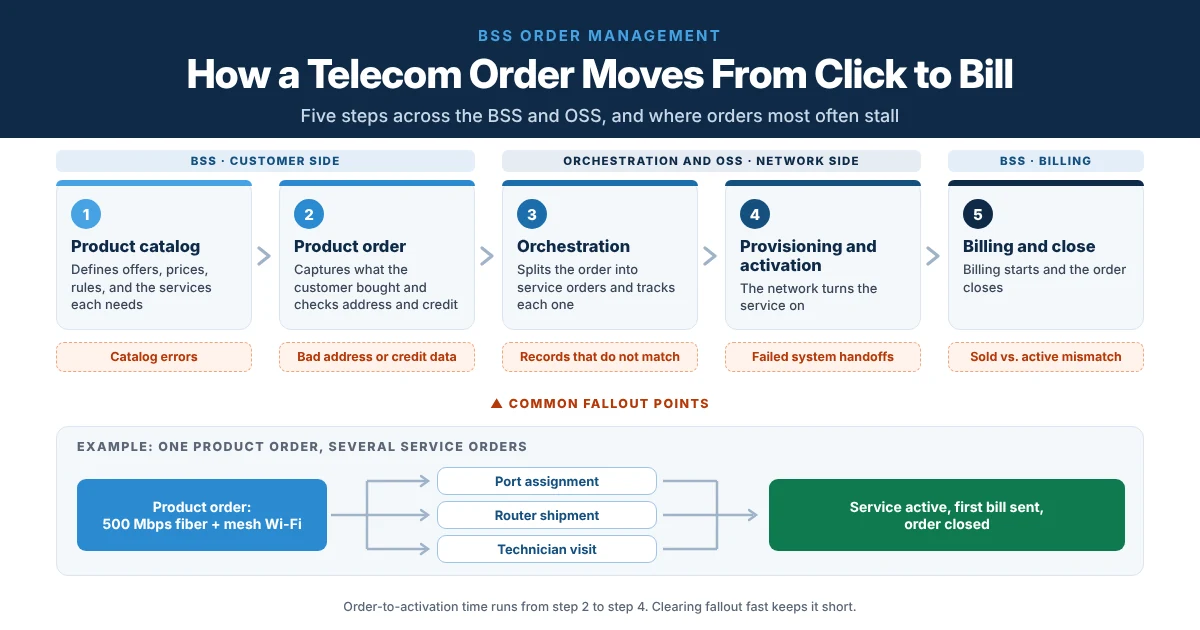 Every order moves from catalog to billing, and fallout can happen at any handoff along the way
1. The Catalog Defines What Can Be Sold
Every order starts in the product catalog. It lists each offer, its price, its options, and its rules. In catalog-driven order management, the catalog also maps each product to the network services it needs. So when a team launches a new plan, it updates the catalog instead of rewriting code.
2. The Product Order Captures What the Customer Bought
Next, the customer or an agent places a product order, such as “500 Mbps fiber with mesh Wi-Fi.” The system then checks the address, credit, and whether the customer qualifies. For product order management in telecom, accuracy at this step prevents most problems later.
3. Orchestration Splits It Into Service Orders
Telecom order orchestration then breaks the product order into technical service orders. For example, one fiber order might need a port assignment, a router shipment, and a technician visit. The orchestrator sends each task to the right OSS system and tracks every result.
4. Provisioning and Activation Turn the Service On
The network then provisions and activates the service. This is also where teams measure order-to-activation time. Our guide to service provisioning and activation covers this step, and many CSPs add dedicated activations and onboarding support.
5. Billing Starts and the Order Closes
Finally, the order closes and billing begins. Any gap between what the customer bought and what the network turned on shows up here as a billing error. For this reason, billing support and order teams need to share the same data.
What Has Changed in Modern Telecom BSS
Four shifts are reshaping BSS order management.
Standard Open APIs
TM Forum Open APIs give systems a common way to talk to each other. For example, the TMF622 Product Ordering API defines how to place and track a product order. TM Forum released its stable version 5.0 in May 2026. When the catalog, CRM, and orchestrator all use these APIs, OSS/BSS integration becomes much simpler.
Catalog-Driven Design
In controlled tests, catalog-driven orchestration built on TM Forum standards cut integration effort by 70% to 90%. Real projects will vary. Still, the direction is clear: launch products by changing data, not code.
Cloud-Native BSS
Cloud-native BSS now leads new projects. Cloud options held 62% of the telecom order management software market in 2025, according to Mordor Intelligence. In addition, the same report values the market at $1.61 billion in 2026, rising to $2.87 billion by 2031. North America is the largest region, with about 35% of revenue.
AI in Live Order Workflows
AI is also moving from pilots into live order workflows. Today, it mostly flags orders likely to fail, suggests fixes, and resubmits simple errors. People still handle the complex cases.
Traditional vs. Modern BSS Order Management
The table below compares the two approaches.
| Area | Traditional BSS | Modern BSS |
|---|---|---|
| Product launches | Code changes in several systems | Catalog updates, often with no code |
| Integration | Custom point-to-point links | Standard TM Forum Open APIs |
| Deployment | On-premises, with slow upgrades | Cloud-native, with frequent updates |
| Order tracking | Separate views in each system | One end-to-end order view |
| Fallout handling | Found late and fixed by hand | Flagged early, with AI suggestions |
| Order-to-activation | Slower, with many handoffs | Faster, with fewer handoffs |
Why Order Fallout Still Needs People
Order fallout in telecom happens when an order stops before it completes. Common causes include bad address data, catalog errors, records that do not match, and failed handoffs between systems. Modern platforms catch more of these issues. However, automation alone does not fix fallout.
In practice, someone still has to find the root cause, correct the data, and update the customer. The teams that clear stuck orders fast, and fix why they got stuck, decide real results. Our guide to telecom order fallout management explains how to set up that work. In addition, close service delivery coordination keeps orders from slipping between teams.
A Quick BSS Order Management Checklist for CSPs
Use these questions to judge whether your setup is keeping up:
- Can you see every order’s status from one screen?
- Does your catalog drive both product and service orders?
- Do your core systems use TM Forum Open APIs?
- Do you track order-to-activation time and fallout rate by product?
- Does every stuck order have a clear owner?
- Do billing and activation records match automatically?
Keep Every Order Moving From Click to Bill
Modern BSS platforms make orders faster to build and easier to track, but results still depend on the people behind them. Sequential Tech supports CSPs, MVNOs, and fiber providers with order management, activations, billing support, and service assurance teams that clear fallout and keep order-to-activation times low. Talk to our order management expert about reducing fallout and speeding up every order across your BSS.
Frequently Asked Questions
What is BSS order management?
BSS order management is the process and software that capture, check, and track telecom customer orders. It turns a customer’s product order into service orders for the network, then confirms activation and starts billing. It connects sales, provisioning, field service, and billing teams.
What is the difference between a product order and a service order?
A product order describes what the customer bought, such as a fiber plan with Wi-Fi. A service order describes the technical work needed to deliver it, such as a port assignment or router setup. One product order often creates several service orders.
What causes order fallout in telecom?
Order fallout usually comes from bad address data, catalog errors, records that do not match, or failed handoffs between systems. Missing customer details and network capacity limits are also common causes. Fixing the root cause, not just the single order, prevents repeat fallout.
What is the TMF622 API?
TMF622 is a TM Forum Open API for product ordering. It gives CSP systems a standard way to create, update, and track product orders. TM Forum released its stable version 5.0 in May 2026. As a result, different BSS systems can connect with less custom work.
How can CSPs reduce order-to-activation time?
Start with a clean product catalog and accurate address data. Then use orchestration to automate handoffs, track every order from one view, and give each stuck order a clear owner. Finally, review fallout causes each week and fix the most common ones first.